

Teach from your own PDFs and check understanding as you go
ClassKite is an interactive learning platform for teachers. Write on your PDFs on the classroom display, run practice that marks itself, set it for home and hold quizzes under quiz conditions. Teacher Basic is free.
How ClassKite works
From lesson prep to student insight in one lesson
Upload your material, teach live, run practice and see who needs help as they answer.
One teaching cycle, five steps
Prepare
Build the lesson from the PDFs and questions you already have.
In class
Teach on the board and run live practice that marks itself.
At home
Open the same practice for students to do in their own time.
Quizzes
Run a one-attempt SBQ quiz and release the results when you decide.
Progress
Read each session's report, and the Gradebook across the term.
In class: know who needs you while the lesson is still running
Teach from your own PDFs
Write, highlight and add notes on any page. Students who open the same PDF follow the page you're on.
Live practice
Start a practice from the board. Answers are marked the moment students submit them, and a stuck student can raise a help flag.
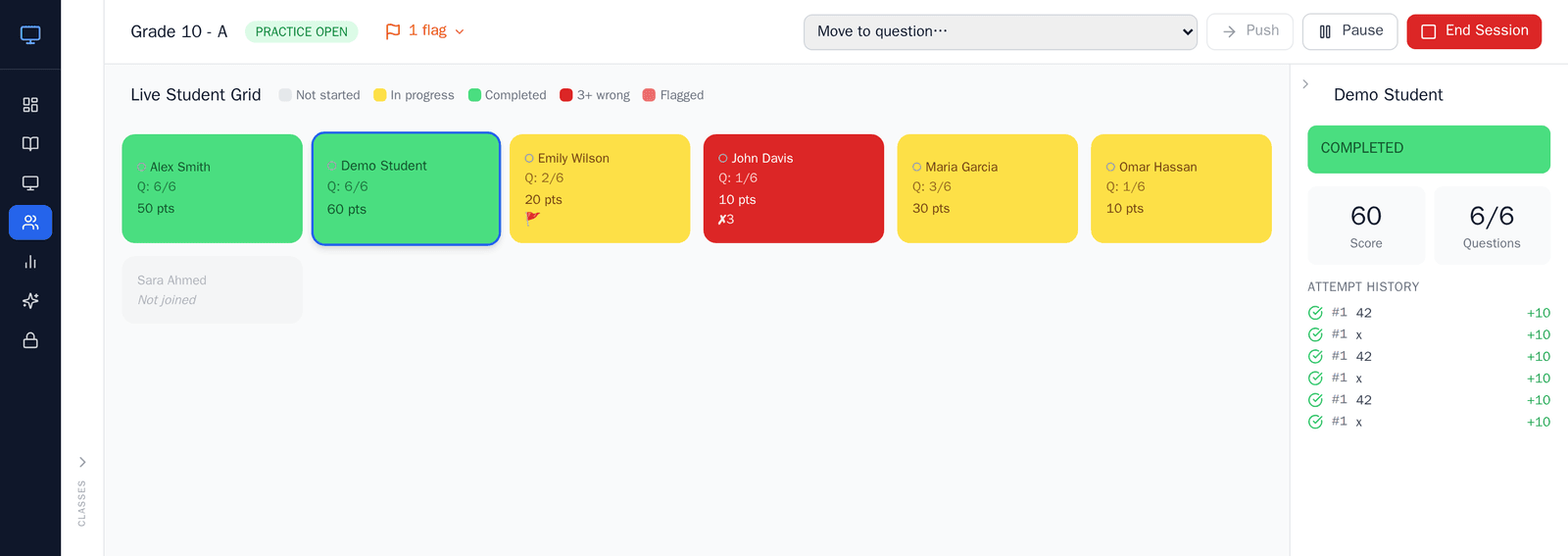
Live Student Grid
See each student's status, score and help requests as they work. It is part of Teacher Plus and the School plan; Teacher Basic shows a blurred preview.
Step in while it matters
Spot a student with several wrong answers on the same question and go to them, or move the class to that question and work it through together.
At home, in quizzes and across the term
At home: the same practice, in the student's own time
Open a practice for self-practice and students work through it on their own devices, with instant marking and retakes. There are no due dates: you close it when you're ready.
Quizzes: quiz conditions, released when you decide
In SBQ mode each student answers every question once and sees only "Answer recorded". Copying is turned off and answers given after leaving the page are flagged. There is no timer or webcam proctoring.
Progress: one picture from every session
Every session gets its own report, and the Gradebook turns a term's practices into a grade for each student. Both are part of Teacher Plus and the School plan.
See it before you sign up
Try the annotator
Write on a sample PDF in your browser. No account is needed, and nothing is saved.
Watch the tutorial
A walkthrough of the teaching cycle on real screens.
Read the Teacher's Guide
The ClassKite workflow, step by step, in one article.
See what each plan includes
Teacher Basic is free. Teacher Plus and the School plan add the live grid, Reports, the Gradebook and AI drafting.
Frequently asked questions
What is ClassKite?
ClassKite is an interactive learning platform for teachers. You teach from your own PDFs on the classroom display, run practice that marks itself, set the same practice for home and run quizzes under quiz conditions. It runs in a web browser, so there is nothing to install.
What can I do during a live lesson?
Present a PDF and write on it as you explain. Students who open the same PDF follow your page. When you're ready, start a practice: students answer on their own devices, every answer is marked as it arrives, and a stuck student can raise a help flag.
What does the Live Student Grid show me?
A card for every student in the class, with their status (not started, in progress, completed or asking for help), their score, and whether they are connected or away. Click a card to see that student's attempts. The grid is part of Teacher Plus and the School plan; on Teacher Basic it is a blurred preview.
Can I use ClassKite to create quizzes for my maths class?
Yes. Write multiple choice, true/false, fill-in-the-blank (word or number), matching and jumbled-sentence questions, with LaTeX for equations. A number answer can be typed as a decimal or a fraction. Run the quiz as live practice, or in SBQ mode for one attempt per question.
Can students practise independently at home?
Yes. Open any practice for self-practice and students find it on their dashboard. Answers are marked straight away, and students can retake it. There are no due dates: it stays open until you close it.
Can I run an exam, and which conditions can I set?
ClassKite has quizzes rather than an exam mode. In SBQ mode each student answers every question once, sees only "Answer recorded", and gets the results when you release them. Copying the questions is turned off and answers given after leaving the page are flagged. There is no timer, scheduled window or webcam proctoring. On iPads, you can also require Safe Exam Browser.
How do I track each student's progress?
Every live and self-practice session gets its own report, with a row for each student. The Gradebook adds a term's practices up into a grade for each student, with report cards. Both are part of Teacher Plus and the School plan. Students see their own results on every plan.
Is there a free plan?
Yes. Teacher Basic is free. It includes PDF annotation, writing questions, and live practice, self-practice and SBQ quizzes that mark themselves, and students see their own scores. Your view of each student's results, AI question drafting and larger uploads are part of Teacher Plus and the School plan. The pricing page shows the current limits.
Do students need an account?
Yes, a free one, with their own email address. A student creates it when they first join a class with its code. Or you import a class list, and ClassKite creates the accounts with a first-time password that each student changes when they first sign in. Students never pay.
How does school billing work?
Schools pay for teachers in blocks of 15 seats, monthly or annually. Each covered teacher gets the same features as Teacher Plus, and a school admin invites teachers and manages the seats. Students are never charged.
Which payment methods are supported?
Payments are handled securely by PayPal.
What happens to my data if I downgrade?
If a paid subscription ends, the account moves to the free Teacher Basic plan. Your content is kept, and the paid features (reports, the Gradebook, the live student grid, AI generation and larger uploads) pause until you upgrade again. Basic's limits apply to anything new you create.
Student privacy and security
We never sell student data
ClassKite is paid for by subscriptions, not advertising. We don't sell personal information, and there are no third-party ads.
EU infrastructure, encrypted connections
ClassKite runs on infrastructure in the European Union, and connections are encrypted in transit.
Role-based access
Teachers see their own classes, school admins manage their school, and students see only their own work.
Ready to try ClassKite?
Create a free Teacher Basic account and teach your first lesson from a PDF you already have.
Create a free teacher account